(613) 498-8989 [email protected]
  • Business Services
TechTutors
  • Home
  • Tips & Tricks
  • Contact Us
  • ProTech IT Services
  • News
  • Training / Classes / Webinars
  • Help
Select Page

Wi-Fi vs Internet: What’s the Difference?

by Tracey Bullock | Jul 9, 2026 | General Tips, Hardware, Tips, WiFi

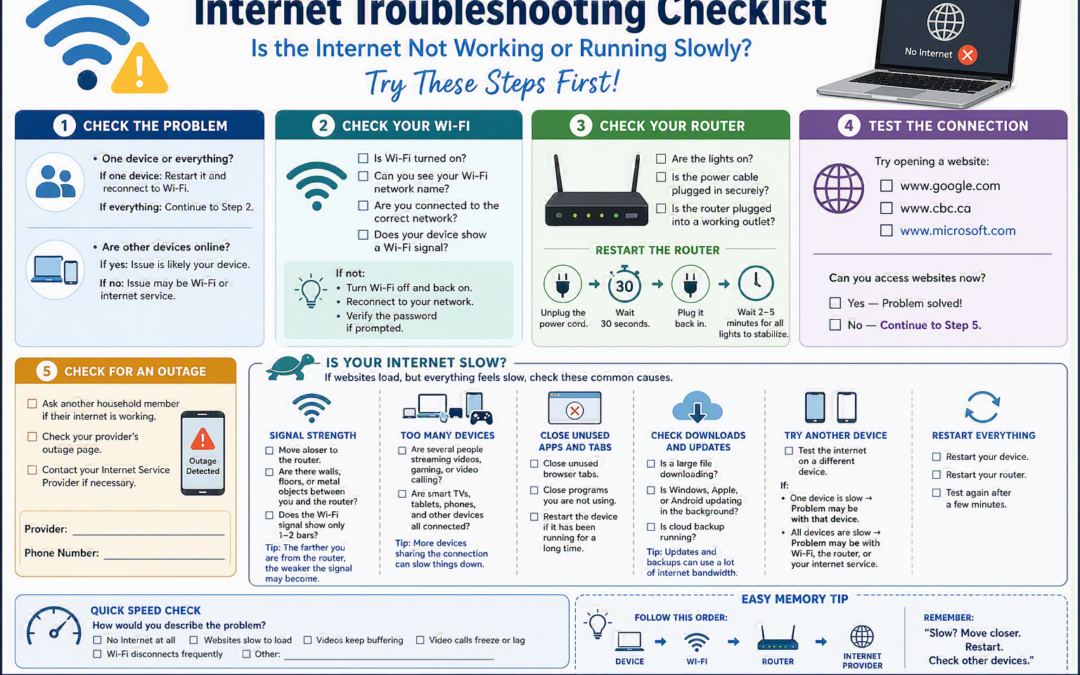
Many people use the terms Wi‑Fi and internet as if they mean the same thing, but they actually serve different purposes. Think of it this way: The Internet is like a network of roads connecting cities around the world. It allows you to visit websites, send emails,...

Protect Your Devices from the Heat

by Tracey Bullock | Jul 8, 2026 | General Tips, Hardware, Tips

Introduction     We’ve all done it. You’re running errands, stop to grab a few things, and leave your phone, laptop, tablet, or other gadgets in the car for “just a few minutes.” The problem? Those few minutes can be surprisingly hard...

Ransomware in 2026: What You Need to Know (and How to Stay Safe)

by Tracey Bullock | Feb 17, 2026 | Cyber Security, Passwords, Protection

Introduction   Technology changes fast, and so do the tricks used by cybercriminals. If you’ve been hearing the word “ransomware” more often lately, you’re not alone – and yes, it’s something worth paying attention to. But don’t worry. You don’t need to be...

Ensuring Your Online Safety: A Guide for Strong Passwords

by Tracey Bullock | May 14, 2025 | Cyber Security, Passwords

Introduction In today’s digital age, having strong passwords is crucial to protect your personal information from hackers. As an IT Professional, I want to help you understand how to create and maintain strong passwords to keep your online accounts secure. Why...

“Don’t Panic! You are Not Alone” – Understanding POP-UP Scams and How to Fix Them

by Tracey Bullock | Apr 13, 2025 | Cyber Security, General Tips

Introduction If you’re reading this, you might have just had something really alarming pop up on your screen. Maybe it said your computer is infected. Maybe it played a loud noise or warned you not to shut anything down. Maybe it told you to call a number for...
« Older Entries

Recent Posts

  • Wi-Fi vs Internet: What’s the Difference?
  • Protect Your Devices from the Heat
  • Ransomware in 2026: What You Need to Know (and How to Stay Safe)
  • Ensuring Your Online Safety: A Guide for Strong Passwords
  • “Don’t Panic! You are Not Alone” – Understanding POP-UP Scams and How to Fix Them

Recent Comments

  • william Thomson on Top 5 Tips For Using Your PC Safely!
  • Roger H on Top 5 Tips For Using Your PC Safely!
  • Cheryl Maine on Are You Backed Up?
  • shareit it on Is Your PC Secure? Updates will Help!

Archives

  • July 2026
  • February 2026
  • May 2025
  • April 2025
  • June 2023
  • April 2023
  • February 2023
  • March 2019
  • February 2018
  • November 2016
  • October 2016
  • November 2015

Categories

  • Apple
  • Backup
  • Cyber Security
  • General Tips
  • Hardware
  • Passwords
  • Protection
  • Service
  • Tips
  • WiFi
  • Windows

Meta

  • Log in
  • Entries feed
  • Comments feed
  • WordPress.org
  • Home
  • Tips & Tricks
  • Contact Us
  • ProTech IT Services
  • News
  • Training / Classes / Webinars
  • Help
  • Facebook
  • X
  • RSS
Copyright © 2023 TechTutors Inc. All rights reserved.